Tangent Line to Arc
Creates a tangent line to an arc at a specified angle and length. No direction selector required — the angle and length fully define the result.
What It Does
The Line/Tanto,A operator creates a tangent line to an arc at a specified angle. Enter the arc reference, the angle in degrees, and the length of the tangent line segment. No direction selector is required.
Syntax
Quick Input
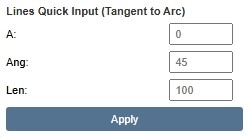
Quick Input panel — XyzPilot interface
Direction Selector
No direction selector is required. The Ang field specifies the angle of the tangent line and fully determines the result. The Len field specifies the length of the line segment created.
Worked Examples
Analytic Rule
FAQ
What does the Ang field control?
Ang specifies the angle in degrees at which the tangent line touches the arc. The tangent point on the arc is determined by this angle. The tangent line is perpendicular to the arc radius at that point.
Does Line/Tanto,A use a direction selector?
No. Line/Tanto,A does not use XL/XS/YL/YS or Start/End selectors. The angle (Ang) and length (Len) fully define the result.
What does Len control?
Len specifies the length of the tangent line segment created in mm.