Tangent to Circle at Angle
Creates a tangent line to a circle at a specified angle. The direction selector (XL/XS/YL/YS) must match the quadrant the angle falls in — if not, XyzPilot returns an error and no line is created.
What It Does
The Line/C,Atangl operator creates a line tangent to a circle at a specified angle. The direction selector (XL/XS/YL/YS) determines which of the two possible tangent solutions is created. The angle must fall within the correct quadrant for the chosen selector — if it does not, XyzPilot returns an error and no line is created:
Angle 45.0° does not fall inside the quadrant for position XLarge. No tangent line created.This means the angle 45° is not valid for the XLarge selector — choose a different selector or adjust the angle.
Syntax
Quick Input
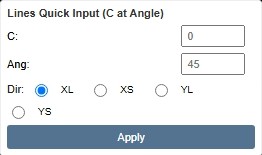
Quick Input panel — XyzPilot interface
Direction Selector
The selector specifies which quadrant the tangent line angle must fall in. The angle you enter must be within the valid range for the chosen selector — if not, XyzPilot returns an error and no line is created.
| Selector | Valid angle quadrant | Approximate range |
|---|---|---|
XL (XLarge) | Tangent line pointing in positive X direction | ~315°–360° / 0°–45° |
XS (XSmall) | Tangent line pointing in negative X direction | ~135°–225° |
YL (YLarge) | Tangent line pointing in positive Y direction | ~45°–135° |
YS (YSmall) | Tangent line pointing in negative Y direction | ~225°–315° |
Angle X° does not fall inside the quadrant for position XLarge. No tangent line created.Solution: choose the correct selector for your angle, or adjust the angle to match the selector.
Worked Examples
Analytic Rule
FAQ
How is the angle measured?
The angle specifies the direction of the tangent line in degrees. The chosen direction selector (XL/XS/YL/YS) must match the quadrant that angle falls in. If the angle does not fall inside the correct quadrant, XyzPilot returns an error: Angle X° does not fall inside the quadrant for position XLarge. No tangent line created.
What happens if I choose the wrong selector?
XyzPilot returns an error and no line is created. Choose the selector that matches the quadrant your angle falls in: XL for ~0°–45°, YL for ~45°–135°, XS for ~135°–225°, YS for ~225°–315°.
What is the difference between this and Line/P,Tanto,C?
Line/C,Atangl creates a tangent at a specified angle (direction). Line/P,Tanto,C creates a tangent through a specified point.